How does the RSVP work?
Guests access your RSVP through the RSVP page on your wedding website. Once they identify themselves, they can complete any open RSVP forms available to them.
RSVP Forms collect attendance and any other information you need. Most weddings only need one main form, although you can create additional forms with their own status and access rules.
Create an RSVP form
- Go to RSVP Forms and select New Form.
- Add a title and an introductory message for your guests.
- Add, edit and reorder the questions you want to ask.
- Open Settings to choose the form status and who can respond.
- Preview the form and save it.
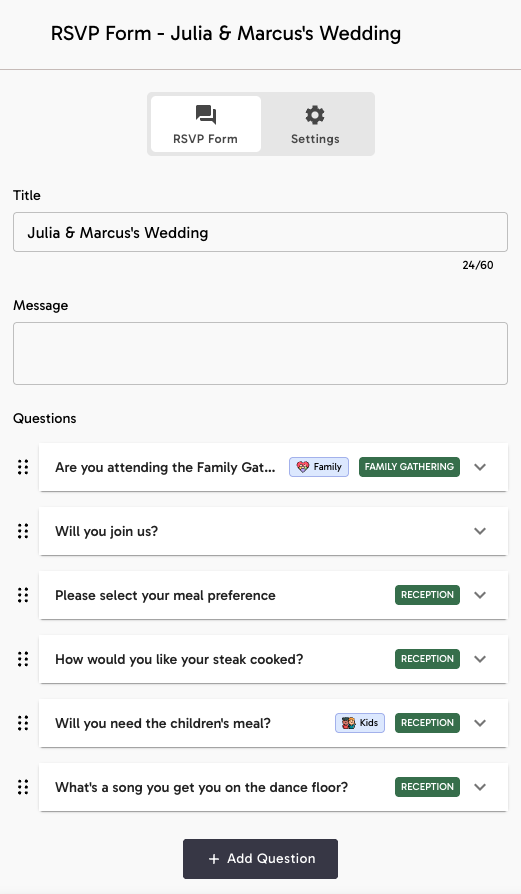
Question types
- Text: lets a guest write their own answer, such as dietary requirements.
- Multiple Choice: asks a guest to choose from options you provide, such as a menu choice.
- Attendance: records whether the guest is attending and contributes to your attendance totals.
- Number: collects a numeric answer.
A question can relate to a wedding event, be limited to particular Guest Tags, or appear conditionally after an earlier multiple-choice answer.
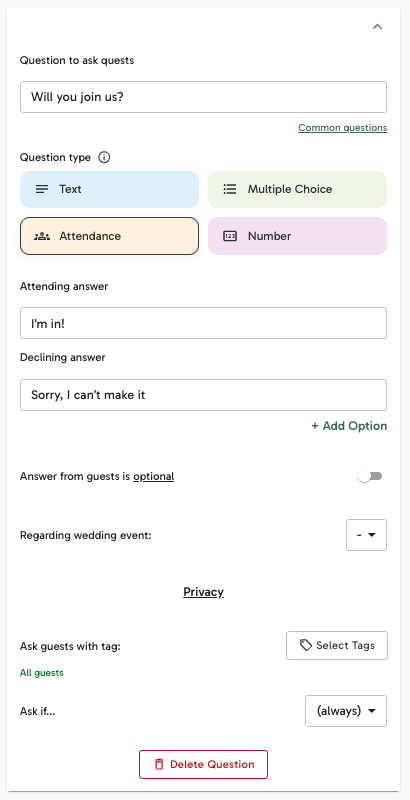
Ask a follow-up question
Use Ask if... when a question should only appear after a guest gives a particular answer. Select an earlier multiple-choice question, then choose the answer that should reveal your follow-up question.
For example, you could ask How would you like your steak cooked? only when a guest selects the steak option in your meal-choice question.
Draft, Open and Closed
- Draft: the form is still being prepared and is not available to guests.
- Open: eligible guests can see the form and submit responses.
- Closed: the form keeps its existing responses but stops accepting new ones.
Choose who can respond
When no Guest Tags are selected, the form is available to all existing guests. Select one or more tags under Who can respond to this RSVP form? when it should only be available to a particular group.
You can separately enable an Open Invitation when people who are not on your guest list should also be able to respond.
Can someone RSVP if I haven’t added them to my guest list?Do I need multiple forms?
One form can collect attendance for several wedding events and show different questions to different guest groups. A second form is most useful when it needs a separate response period, such as an early Save-the-Date form followed by your final wedding RSVP.
Learn when to use more than one RSVP formView responses
The RSVP Forms overview shows the number of responses received. Select View Responses for a form, or open Guest Management to review attendance and answers alongside each guest.
A form with responses can be archived when you no longer need it. Its response history is preserved.